
Starmind Agent
Starmind Agent is a conversational assistant that answers from your organization's own knowledge. That knowledge includes the questions and answers in Starmind and the documents from your connected data sources.
Ask in natural language. Starmind Agent searches your knowledge for you and writes an answer only from what it finds, citing every source inline. When your knowledge doesn't cover the question, it tells you so instead of guessing. It then points you to the colleagues who are most likely to know, or lets you ask your network anonymously.
Getting Started
Open Starmind Agent from the side menu in Starmind. On networks where Starmind Agent is enabled, it replaces the StarGPT entry.
AvailabilityStarmind Agent is enabled per network. If you don't see it in the side menu, contact your Starmind administrator or your Customer Success Manager.
The Starmind Agent Workspace
Starmind Agent has three areas that work together.
| Area | What you find there |
|---|---|
| Session history (left) | Start a New conversation or continue a previous one. Your conversations are saved, and only you can see them. Click the Starmind logo to return to Starmind. |
| Conversation (center) | Ask anything in natural language. The answer appears in real time with inline source citations, and experts are suggested alongside it. |
| Context panel (right) | Understood as shows how Starmind Agent interpreted your latest question, and the topics it recognized from your organization's Knowledge Graph. Key questions lists the questions you've asked in this conversation; click one to jump back to it. |
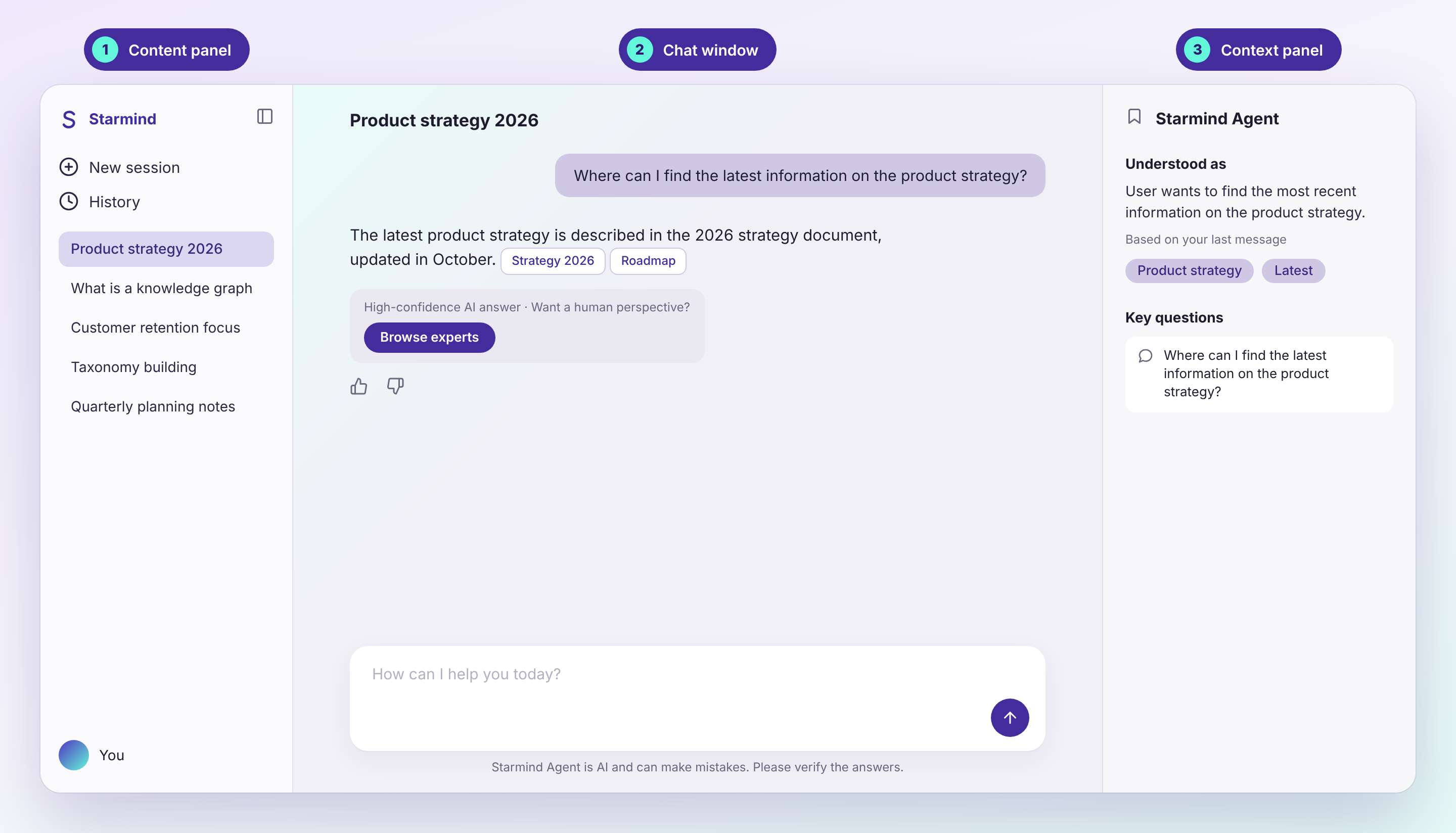
Session history, conversation and context panel
How Starmind Agent Answers
Starmind Agent works like a careful researcher. Each time you ask a question, it:
- Understands your question in context. Follow-ups like "and for Germany?" are turned into a complete question using the earlier conversation.
- Recognizes the topics. It matches your question against your organization's Knowledge Graph and restates precisely what you want to know. This is what you see under Understood as.
- Searches your knowledge. It searches Starmind questions and answers and your connected documents at the same time.
- Fills the gaps. If the results don't fully cover your question, it runs up to five additional searches aimed at the parts that are still missing.
- Writes a grounded answer. The answer is based only on the sources it found, and each statement cites its source. If the sources don't cover your question, it says so in one sentence instead of making something up.
- Assesses the answer. It rates how completely the sources answer your question and adapts what it offers next: for example, suggesting experts or posting your question to your network.
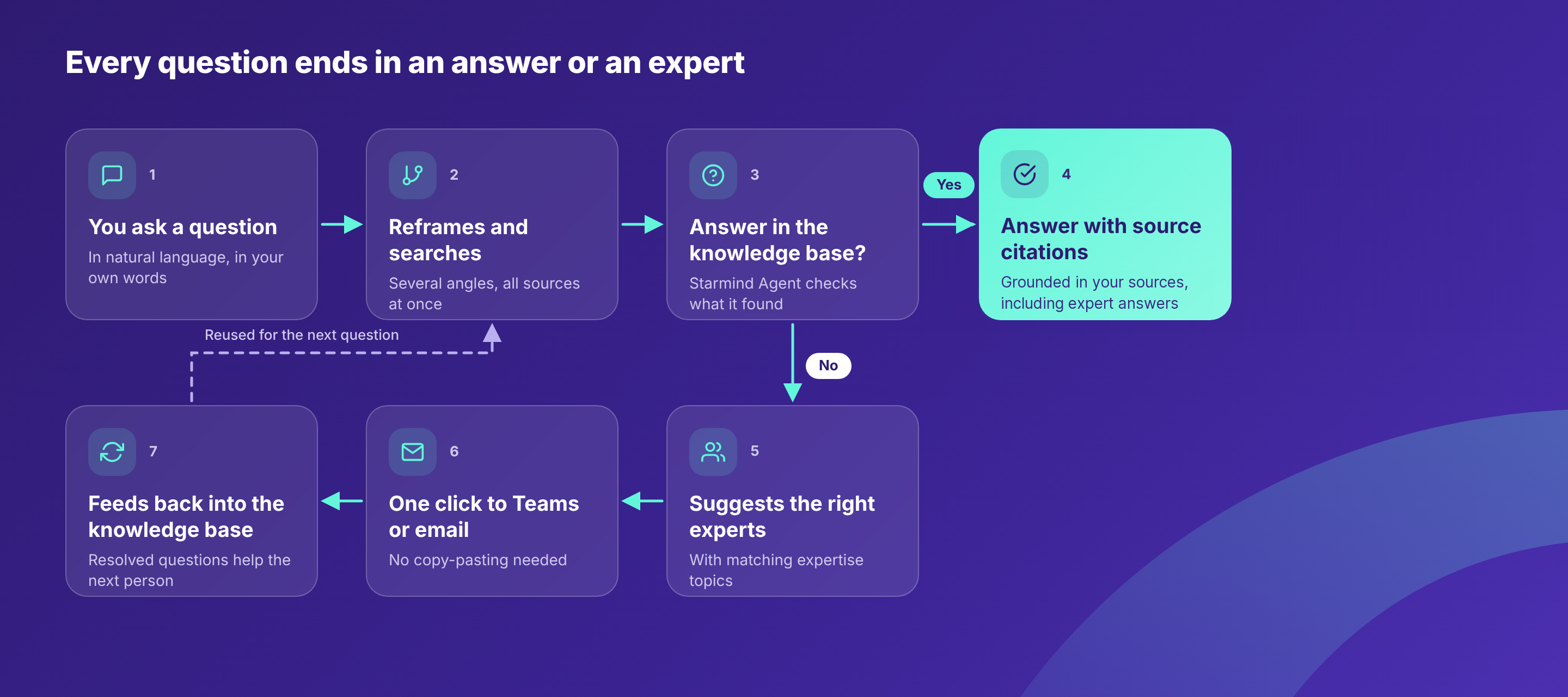
How Starmind Agent answers a question
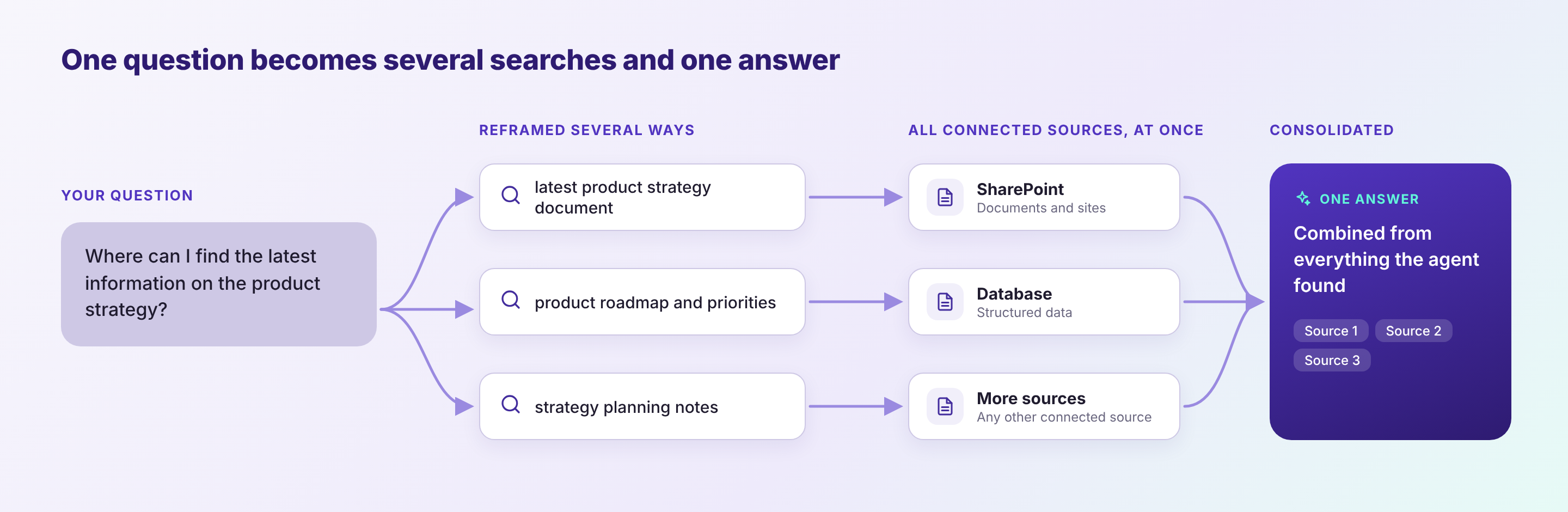
One question, several searches, one answer
Key Capabilities
Answers You Can Verify
Every answer cites its sources inline. Hover over a citation to see the source, and click it to open the original Starmind answer or document. When an answer comes from a Starmind answer written by a colleague, Starmind Agent names them.
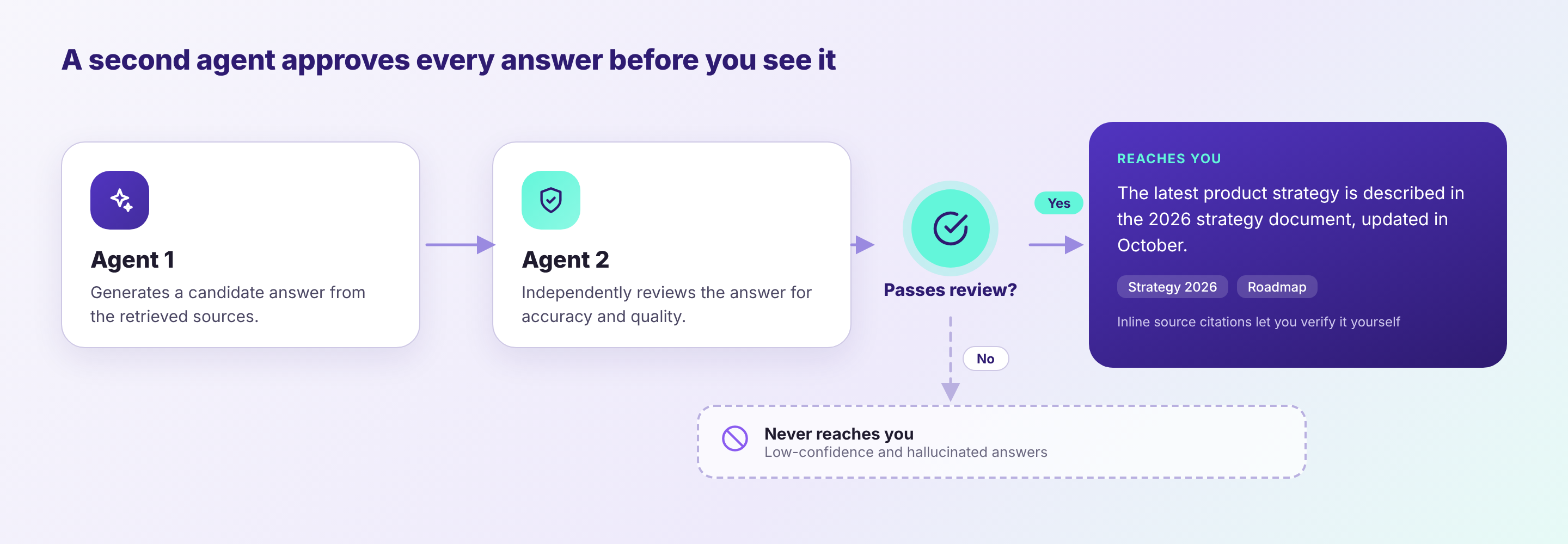
Hover over a citation to see its source
Always check important answersStarmind Agent is instructed to answer only from your organization's sources, but like any AI it can make mistakes. Use the citations to check anything important before you act on it.
Honest About What It Doesn't Know
When your knowledge doesn't answer the question, or only answers part of it, Starmind Agent says so clearly. Instead of a confident-sounding guess, it shows you:
- the experts in your organization who are most likely to know, and
- the option to Ask network anonymously.
When the answer is well supported, you can still ask an expert to validate it.
Connects You to the Right Expert
Starmind Agent suggests experts with every answer, based on your organization's expertise profiles.
- See why they're relevant. Each expert shows the topics they're known for.
- Preview before you reach out. Hover over an expert to see their profile card, or open their full Starmind profile.
- Start a conversation. Select one or more experts and click Start a chat. Starmind Agent opens a Microsoft Teams group chat with your question as the topic and a pre-filled message you can edit first. If your organization has not enabled Teams contact, you can email the expert instead.
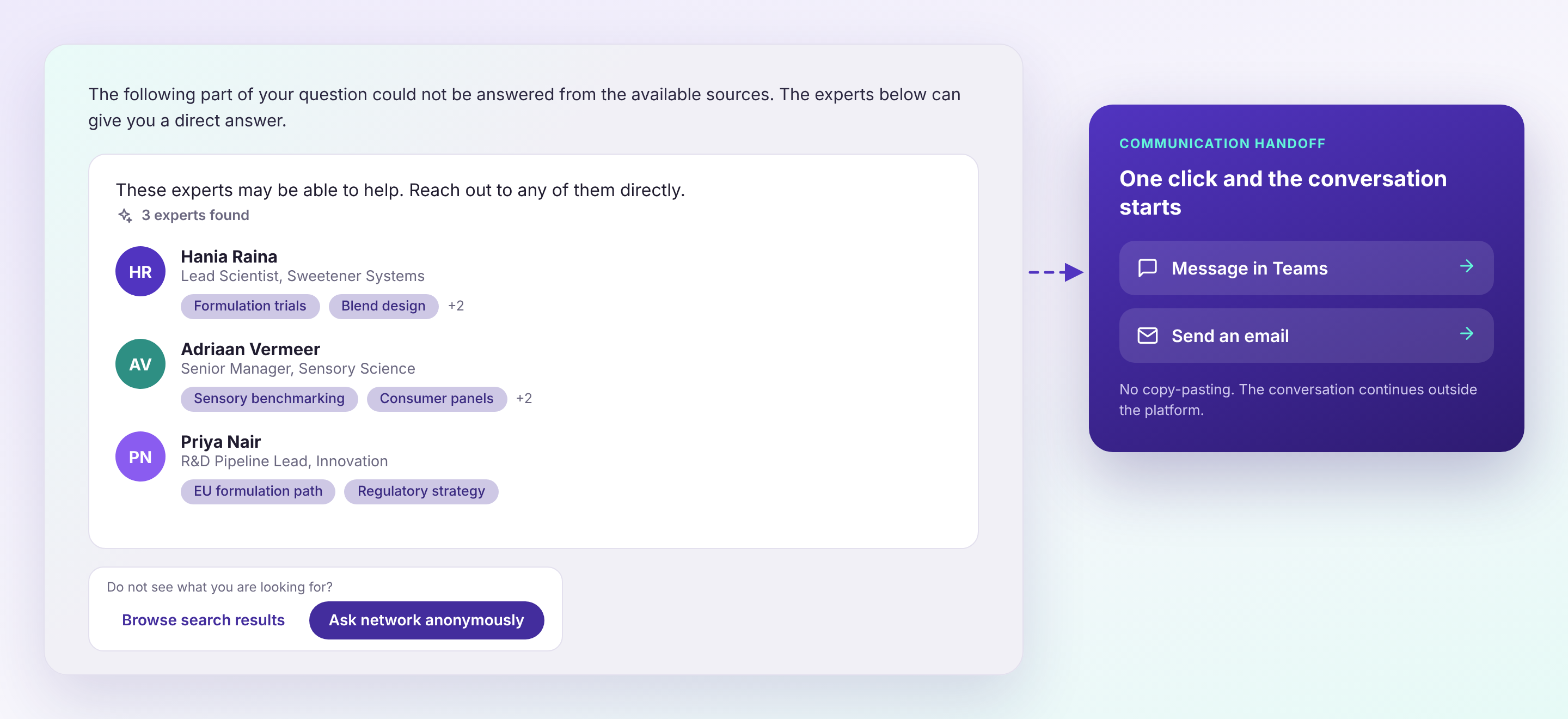
Suggested experts, with the topics they're known for
You can also ask for experts directly. For example: "Who knows about cloud cost optimization?"
Ask Your Network Anonymously
If nobody fits, or you'd rather not ask anyone directly, post your question to your Starmind network anonymously:
- Click Ask network anonymously. Your question is pre-filled.
- Starmind checks for similar existing questions, so you don't ask something that has already been answered.
- Review the topics Starmind identified, choose a knowledge space and category, and post.
The question's status, waiting or answered, stays visible in your conversation. Once a colleague answers, the answer becomes part of your organization's knowledge, and Starmind Agent can use it for everyone who asks next.
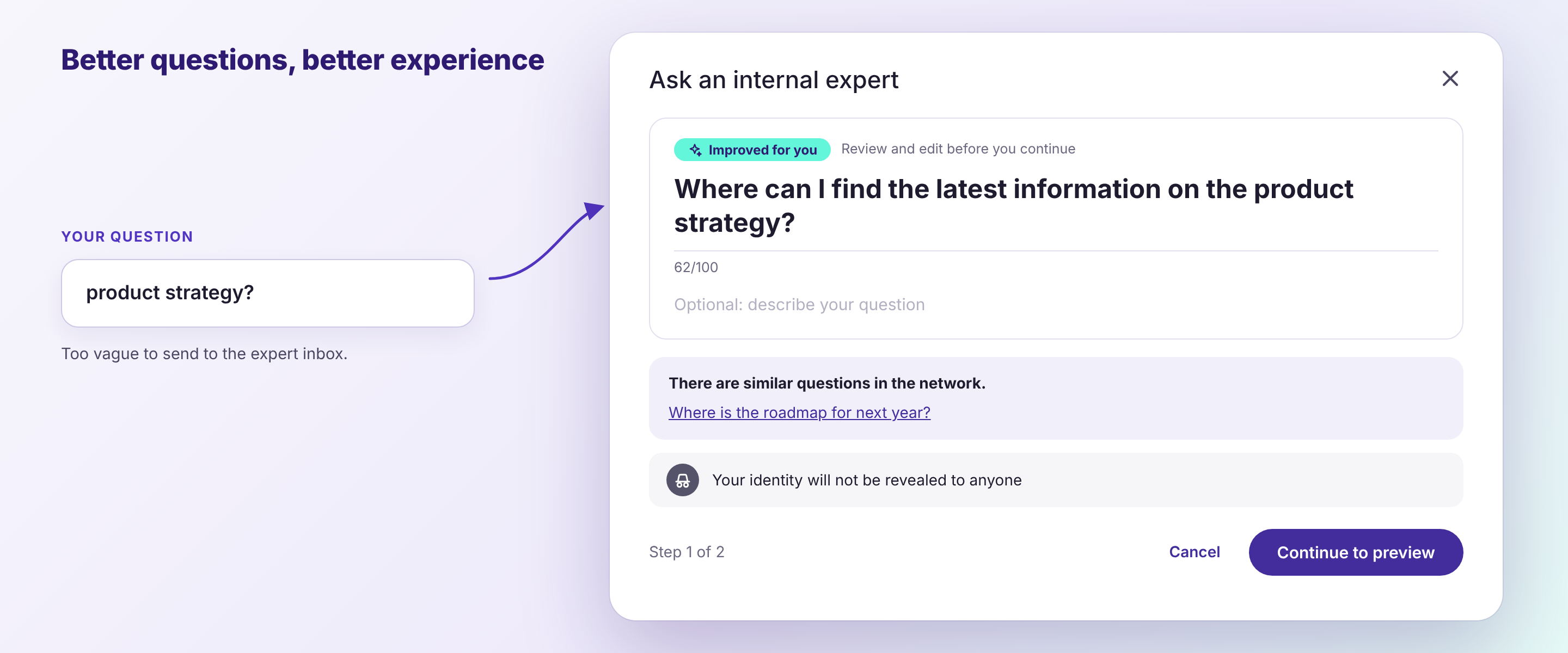
Ask your network anonymously
Shows How It Understood You
The Understood as section in the context panel shows, in plain language, how Starmind Agent interpreted your latest question, along with the topics it recognized. If it misunderstood, rephrase your question and try again. Click a topic to explore it in Starmind.
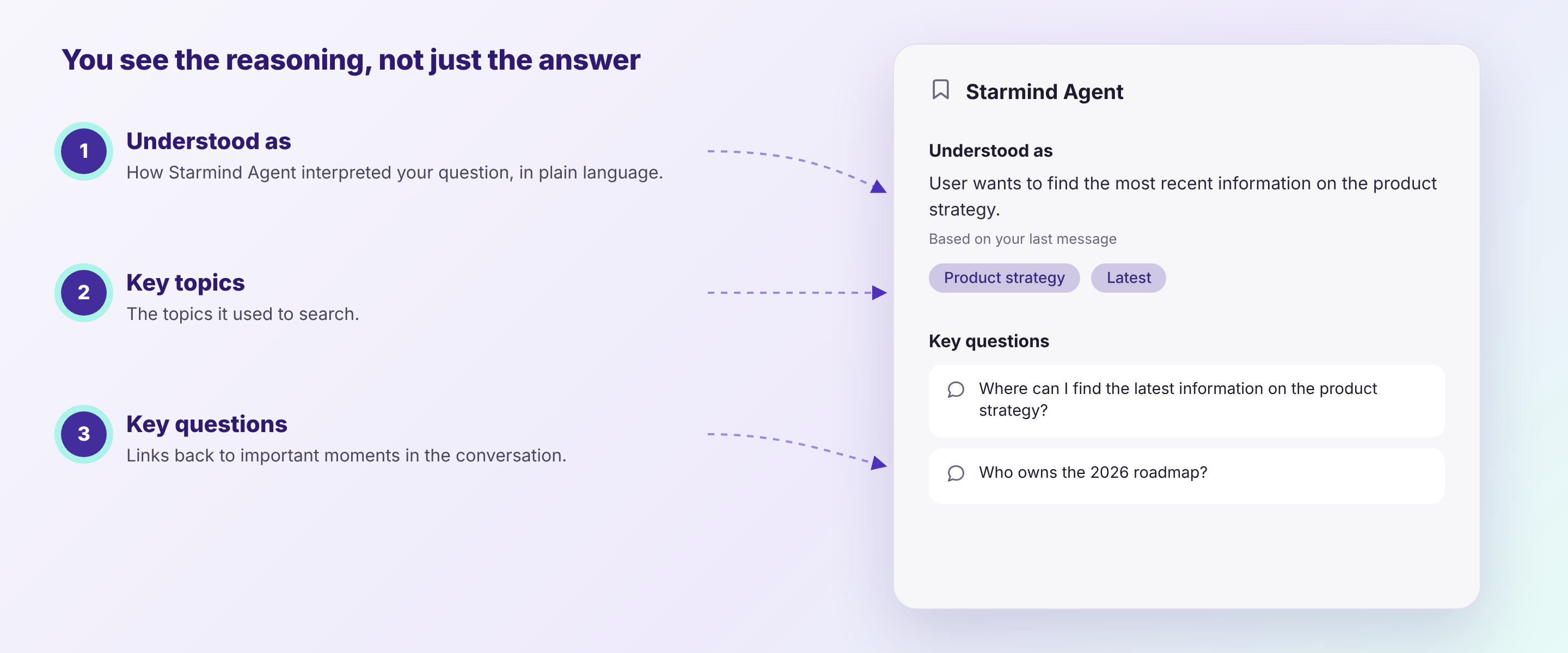
Understood as and Key questions in the context panel
Rate Answers
Use the thumbs up and thumbs down on each answer to tell us whether it helped. You can add an optional comment. Your feedback helps us improve Starmind Agent.
Where Answers Come From
Starmind Agent answers from two kinds of sources:
| Source | What it contains |
|---|---|
| Starmind questions and answers | The questions and answers your colleagues have shared in Starmind. |
| Connected documents | Documents from connected data sources, such as Microsoft SharePoint, Confluence or Google Drive, where the connector has been enabled for AI answers. |
Starmind Agent does not search the internet and does not answer from general AI knowledge.
Connected documents are available to everyone in your networkDocuments enabled for AI answers can be used to answer questions from any user of your Starmind network. Starmind Agent does not apply the document's original access permissions (for example, SharePoint site or file permissions) per user. Only enable sources whose content is meant to be shared across your whole Starmind network.
Data Retention and Privacy
- Your conversations are private. Conversations are saved so you can continue them later. They are linked to your account, and only you can open them.
- Your network's data stays in your network. Each Starmind network has its own isolated knowledge index. Starmind Agent never uses one network's content to answer another network's questions.
- Documents are stored encrypted. When a connector is enabled for AI answers, Starmind stores the extracted text of the documents in encrypted form so Starmind Agent can search and cite them.
- AI processing. Answers are generated with Microsoft Azure OpenAI models hosted in Switzerland for networks hosted in Europe or Switzerland, and in the United States for networks hosted in the US.
- Your administrator stays in control. Starmind Agent can be turned off for your whole network at any time.
Using Microsoft SharePoint Content with Starmind Agent
Starmind Agent can search and cite documents from the Microsoft SharePoint connector. Set up the connector first. Starmind Agent needs no additional permissions.
To use SharePoint documents in answers:
- Enable the connector for AI answers. By default, the connector only uses documents to build expertise profiles. Ask your Customer Success Manager to enable AI answers.
- Review which sites the connector can read. Every document it can read is available to all users of your Starmind network (see Where Answers Come From). Leave out confidential sites, such as HR, Finance or Legal.
| Supported | Not supported |
|---|---|
PDF, Word (.doc, .docx, .dotx) | PowerPoint, Excel, images, video, files larger than 10 MB |
| SharePoint site pages, with the Sites.Selected setup |
The connector checks for new and changed documents every hour. On large sites, the first sync takes several runs, so documents appear in answers gradually. To check that it works, ask about something that only appears in a SharePoint document. The answer should cite it.
FAQ
Does Starmind Agent search the internet or use general AI knowledge?
No. It answers only from your Starmind questions and answers and your connected documents. If they don't cover your question, it says so and suggests experts.
Can Starmind Agent show me content from SharePoint files I don't have access to?
Yes. SharePoint permissions are not applied per user, so every document the connector can read is available to all users of your Starmind network.
Why didn't Starmind Agent find a document I know exists?
Check that the connector can read its site, that AI answers are enabled, and that the file type is supported. The connector checks for changes every hour, and large sites take longer on their first sync.
Who can see my conversations?
Only you, no other user on the network.
Is my anonymous question really anonymous?
Your question is posted without your name shown to other users.
What happened to StarGPT?
Where Starmind Agent is enabled, it replaces StarGPT. Links to StarGPT take you to Starmind Agent.
How do I get Starmind Agent for my organization?
Contact your Customer Success Manager.
Updated 3 days ago